
Claude Code animation prompt for Dribbble-style UI motion
Published September 26, 2026.
Paste the prompt below into Claude Code and answer its three questions: which UI states to show, which colors to use and what music to cut to. The agent then builds a square 14-second video in which one shape, with no cuts, becomes a button, a loader, a music player, a slider, tabs, a chart, a ⌘K palette and a toast, and every change lands on a beat at 120 BPM. Our run took an hour and a half.
UI motion like this is usually made in After Effects or prototyped in Figma. Here Claude Code writes it as code: an HTML page where every frame is computed from time, rendered to video with Playwright and ffmpeg.
The Claude Code prompt, ready to copy
This is the exact prompt we ran.
<inputs>
Ask me for: 8 to 12 UI states I want the shape to become (e.g. button, loader, player, slider, toggle, tabs, chart, command palette, toast), pure black and white or one accent color, and a royalty-free song around 120 BPM (e.g. Mixkit, free for commercial use).
</inputs>

<direction>
Dribbble-level UI motion. One shape, never cut: every state is the same element morphing its size, radius and color while its content swaps with a short blur. A cursor drives every change with real clicks and drags. Light warm-gray canvas, black and white components, one clean UI font (Geist). Springs everywhere, a tiny overshoot at most. The camera zooms so each state fills the frame. The last frame is the first frame, so it loops.
Banned: bouncy easing, particle bursts, glows, gradients on UI chrome, mismatched icon strokes, dead time, anything that looks like a template.
</direction>

<structure>
120 BPM, 7 bars, something happens on every beat.
Button → loader → check → dynamic island → music player with a play/pause morph → scrub the progress bar → it becomes a volume slider that stretches when dragged past max → a toggle flips on the beat → the knob becomes a liquid tab indicator → the tabs open into a chart that draws itself, with a tooltip on hover → it collapses into ⌘K → type to filter → enter → toast → back to the button.
</structure>

<build>
1. One HTML file, square 1440x1440. Every style is computed from time inside seek(t): no CSS transitions, no timers, no state carried between frames.
2. Springs are closed-form step responses. A value that changes target many times is the sum of one spring per change, so it stays a pure function of time.
3. The tab indicator's two edges ride different springs, so the leading edge stretches ahead of the trailing one. Same trick for the toggle knob.
4. Drags are direct manipulation: while the cursor is held, the value is computed from its position. On release it springs back from wherever it was.
5. Analyze the song with numpy for the beat grid and start on a downbeat. Place every UI sound by its measured peak.
6. Render with Playwright: 4 subframes per frame, blended with ffmpeg tmix for motion blur at 60fps.
7. Render one frame per beat before the full render. Fix anything off the grid, cramped or hard to read.
</build>

<gotchas>
Never put will-change on anything the camera scales or the text renders blurry. Text that swaps inside a morphing container needs its own enter and exit timing or it overlaps. Make the last frame identical to the first, cursor position and speed included, or the loop stutters.
</gotchas>

<start>
Ask me for the inputs, then show me the state list on the beat grid before you write any code.
</start>
Each block of the prompt removes one reason AI-generated UI animation usually looks cheap:
| Block | What it demands | What goes wrong without it |
|---|---|---|
<direction> | one shape with no cuts, springs, one font; no bouncy easing, particles, glows or gradients | the piece falls back on stock effects and looks like a template |
<structure> | 7 bars at 120 BPM, an event on every beat | motion drifts off the music and dead seconds creep in |
<build> | every style computed from time inside seek(t), with no CSS transitions, timers or state between frames | the browser captures frames slower than real time, so CSS transitions stutter in the recording |
<gotchas> | no will-change on anything the camera scales, separate timing for text inside a morph, last frame equal to the first | blurry text on zoom, labels drawn over each other, a hitch at the loop seam |
<start> | the state list on a beat grid first, code after | a storyboard mistake costs a re-render instead of one sentence |
The seek(t) rule pays off at render time too: no frame depends on the previous one, so our video was captured in six browser tabs at once.
What to install first
The prompt needs an agent with access to your files and terminal, such as Claude Code. It will not work in the claude.ai chat, because rendering runs through a browser and ffmpeg on your machine. Besides Claude Code you need Node.js, Python with numpy and scipy, ffmpeg, and Playwright with Chromium. On macOS:
brew install node python ffmpeg numpy scipy
mkdir ui-loop && cd ui-loop
npm init -y && npm install playwright
npx playwright install chromium
On Linux, use your distribution's package manager instead of brew. The agent can install anything missing on its own, but that costs extra requests.
How to run it: Claude subscription or go2llm
Start Claude Code in the ui-loop folder and paste the prompt as one message. We made the video with Claude Opus 5.5 and have not tested the prompt on other models.
With a Claude subscription
On a Claude Pro or Max plan, type /login in Claude Code to sign in, /model to pick Opus, then paste the prompt.
Through go2llm
The go2llm gateway lets you run Claude Code with no foreign card and no VPN: registration credits $1 to your balance, you top up in crypto or in rubles via SBP, and you create the key in the dashboard. Three environment variables connect Claude Code to it, and unset clears a leftover ANTHROPIC_API_KEY that could otherwise send authentication past the gateway. Setup details are in the coding tools docs.
export ANTHROPIC_BASE_URL=https://go2llm.tech
export ANTHROPIC_AUTH_TOKEN=gk_sk_YOUR_KEY
export ANTHROPIC_MODEL=claude-opus-5-5
unset ANTHROPIC_API_KEY
claude
Through go2llm, Claude models work with text, while the prompt asks the agent to look at rendered frames. So add this line to the end of the prompt:
The API gateway I use accepts text only and rejects image input. Never open PNG, JPG or any screenshot. Check every beat frame numerically instead: use getBoundingClientRect to confirm that each text fits its container, nothing overlaps and nothing leaves the 1440x1440 canvas, print one line per beat, and give me the path of the contact sheet so I can look at it myself.The agent then checks the layout numerically, and you review the contact sheet yourself. In our run, sheets like this caught half of the agent's mistakes.
What to answer when the agent asks
The agent opens by asking for 8 to 12 states, a color scheme and a track around 120 BPM. Our answers:
- 12 states: a "Get API key" button, loader, check mark, Dynamic Island, music player, slider, toggle, tabs, chart with a tooltip, ⌘K, model palette and toast.
- Colors: black and white plus one accent, go2llm mint
#45FFAA, on a warm gray#ECE9E4canvas, set in Geist. - Music: a track the agent synthesized itself with numpy, 120 BPM, A minor.
Ask for synthesized music. Seven bars cut from a real song almost never loop cleanly: pop phrases run 4 or 8 bars, so the cut lands mid-phrase. In our track, bar 7 ends on E7sus4, which resolves into the Am9 of bar 1, so the seam is inaudible. A synthesized track also needs no license.
Swap the on-screen labels for your own product. In ours, the player "plays" Claude Opus 5.5 and the volume slider became a Temperature slider.
The beat grid the agent shows before writing code
Before the first line of code, the agent lays out what happens on each of the 28 beats. A change at this step costs one sentence; after rendering, it costs a rebuild. Our grid:
| Bar | Beat 1 | Beat 2 | Beat 3 | Beat 4 |
|---|---|---|---|---|
| 1 | click "Get API key", the pill shrinks into a loader | the arc grows | the arc closes into a check | Dynamic Island "Key ready +$1.00" |
| 2 | the island opens into a player | play morphs into pause | the cursor grabs the playhead | releases it |
| 3 | the progress bar becomes a slider | the cursor drags right | hits 1.0, the slider stretches | releases, the slider springs back |
| 4 | the slider becomes a toggle | the toggle switches on | the toggle knob becomes the tab indicator | click "Tokens", the indicator flows over |
| 5 | the tabs open into a chart, the line draws | a dot at the end of the line | tooltip "Thu · 1.28M" | tooltip "Sat · 1.46M" |
| 6 | the chart collapses into ⌘K | the model palette opens | typing "op" | typing "us", Claude Opus remains |
| 7 | Enter, the palette shrinks into a toast | a check in the toast | the toast turns back into the button | hover, loop to the start |
Before the full render, the agent captures one frame per beat and tiles them into a contact sheet. The sheet shows at a glance where a label overflowed or an event slipped off the beat:
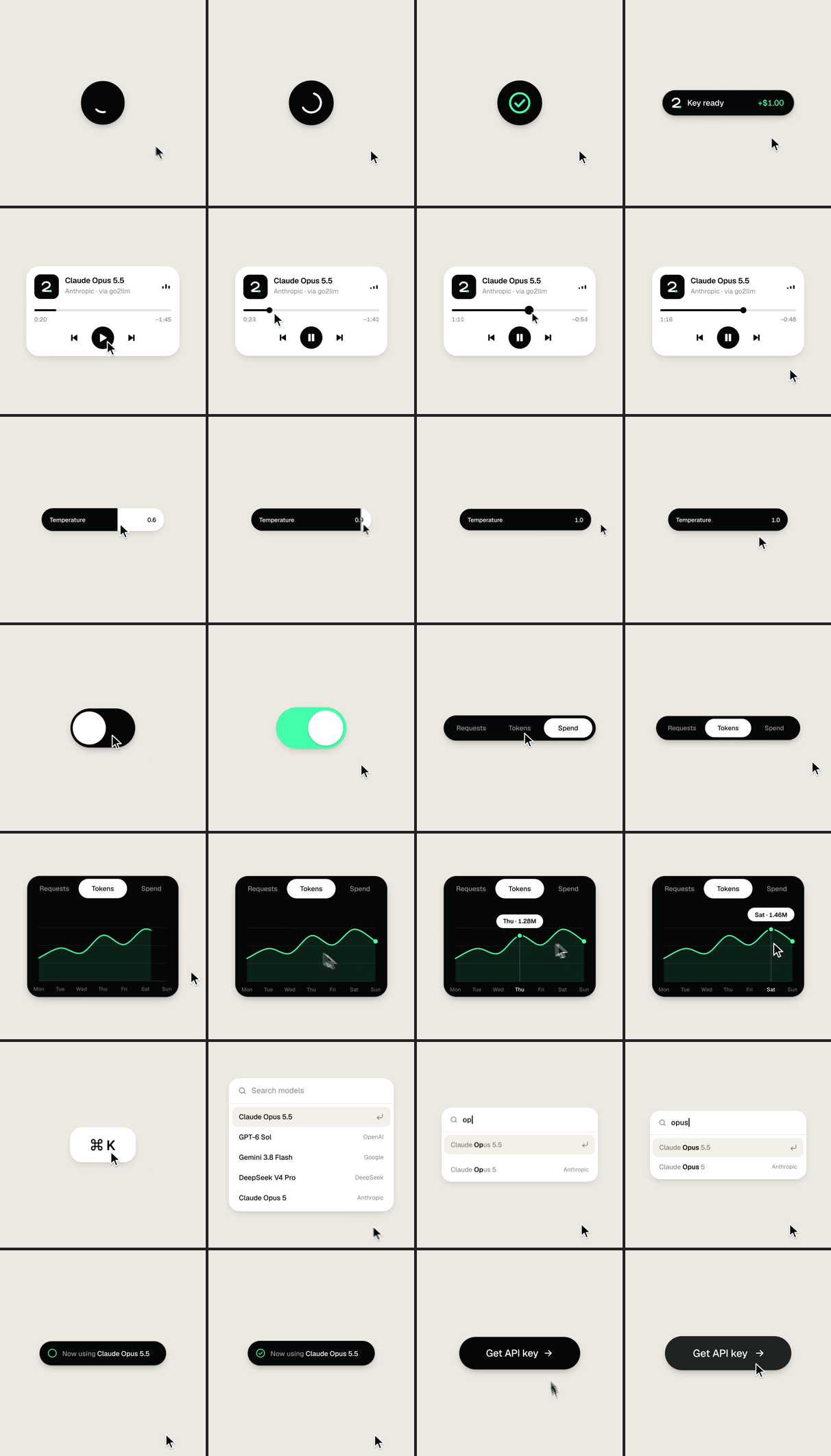
Ask for a second sheet offset 0.3 seconds after each beat as well. On the beats everything is at rest; overlapping text and jerky transitions only show up mid-flight.
Where the agent slips, and how to catch it
In our run the agent made six mistakes, and a separate check caught each one:
| What went wrong | How it was caught | The fix |
|---|---|---|
| Switching from black to white, the shape turned muddy gray for several frames | contact sheet between beats | color now switches faster than the shape morphs |
| As the player turned into the slider, the progress bar read as a black slab | contact sheet between beats | the bar thickens only at the end of the transition |
| When paused, the player's equalizer collapsed into an ellipsis | frame strip of the transition | paused bars now freeze at different heights |
| The click sounded before the beat: the library click peaked at 133 ms, with 96% of its energy before the peak | envelope measurement of every sound | clicks are synthesized with the peak in the first 5 ms |
| The music sank into sub-bass: 91% of the track's energy sat below 160 Hz, which a phone speaker barely reproduces | spectrum by octave | rebalanced, with the music mastered to −15 LUFS |
| The "three loops in a row" check looped the source WAV instead of the audio inside the final MP4 | code review by GPT-6 Sol | the seam check is built from the file the viewer gets |
The prompt's rule to place every sound by its measured peak only works for sounds with a sharp attack. If you bring your own click library, check where each one peaks first.
After the fixes, the frames at 0 and 14 seconds match pixel for pixel, each blended frame is within 1/255 of the mean of its four subframes, and sound peaks sit on their events within 0.02 ms. The final mix is −14.4 LUFS with a −1.0 dBTP peak. The full render, 3,360 screenshots at 4 per frame across 840 frames, took about a minute and a half on an Apple Silicon Mac.
When this prompt is the wrong tool
- To show your real app. The agent redraws the interface from scratch in HTML, and a real product is shown with a screen recording.
- With a real song, unchanged. The agent will find the beat grid, but seven bars of someone else's track rarely loop without a seam.
- For a video longer than 14 seconds without editing the prompt. The
<structure>block is written for 7 bars: for 30 seconds, change the bar count and the event list.
Copy the prompt, open Claude Code in the ui-loop folder and paste it. Connection details are in the docs, and billing is explained on the pricing page.